
User Manual





Get started
14
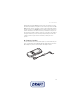
The AC-6 charges the battery much faster than the CA-101. Charging with the
AC-6 is recommended when short charging times are needed.
■ Switch the phone on and off
Warning: Do not switch the phone
on when wireless phone use is
prohibited or when it may cause
interference or danger.
To switch the phone on or off, press and hold
the power key.
If the phone asks for a PIN or a UPIN code,
enter the code (displayed as ****), and select
OK.
Set the time, time zone, and date
Enter the local time, select the time zone of your location in terms of the time
difference with respect to Greenwich Mean Time (GMT), and enter the date. See
Time and date p. 50.
Plug and play service
When you switch on your phone for the first time, and the phone is in the standby
mode, you are asked to get the configuration settings from your service provider
(network service). Confirm or decline the query. See "Connect to serv. support,"
p.
59, and Configuration settings service p. 9.
■ Digital rights management
Content owners may use different types of digital rights management (DRM)
technologies to protect their intellectual property, including copyrights. This
device uses various types of DRM software to access DRM-protected content.
With this device you may be able to access content protected with WMDRM 10,
OMA DRM 1.0 forward lock, and OMA DRM 2.0. If certain DRM software fails to
protect the content, content owners may ask that such DRM software’s ability to
access the new DRM-protected content be revoked. Revocation may also prevent
renewal of such DRM-protected content already in your device. Revocation of
such DRM software does not affect the use of content protected with other types
of DRM or the use of non-DRM-protected content.