
User Manual





Get started
13
For availability of approved enhancements, please check with your dealer. When
you disconnect the power cord of any enhancement, grasp and pull the plug, not
the cord.
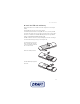
1. Connect the charger to a
wall socket.
2. Connect the lead from the
micro USB charger to the
micro USB socket on the
lower right side of your
phone.
If the battery is completely
discharged, it may take a few
minutes before the charging
indicator appears on the
display or before any calls can
be made.
The charging time depends on
the charger used. Charging a BP-5M battery with the AC-6 charger takes
approximately 2 hours and 15 minutes while the phone is in the standby mode.
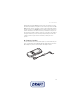
Charge the battery with the CA-101 data cable
The CA-101 data cable,
included in the sales package, is
used for data transfer and slow
charging the battery while
connected to a PC or laptop.
See
USB data cable, p. 56 for
more information. You must
download Nokia PC Suite 6.83
to use with your device.
Updated versions can be added
after version 6.83. Go to
www.nokia.com/support for more information.
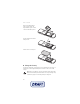
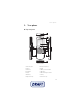
1. Connect the lead from the CA-101 to the micro USB socket on the lower right
side of your phone.
2. Connect the CA-101 to your PC or laptop. USB data cable connected. Select
mode. appears on the display screen of your phone.
3. Select OK and Default mode.