
User's Guide


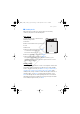
Table Of Contents
- Contents
- For your safety
- General information
- 1. Get started
- 2. Your phone
- 3. Call functions
- 4. Write text
- 5. Navigate the menus
- 6. Messaging
- 7. Contacts
- 8. Call log
- 9. Settings
- 10. Operator menu
- 11. Gallery
- 12. Media
- 13. Organizer
- 14. Push to talk
- 15. Applications
- 16. SIM services
- 17. Web
- 18. PC connectivity
- 19. Battery information
- 20. Technical Information
- Care and maintenance
- Additional safety information
- APPENDIX
- Index

Your phone
17
D
RAFT
■ Standby mode
When the phone is ready for use, and you have not entered any
characters, the phone is in the standby mode.
Main display
1 Signal strength of the cellular network
2 Battery charge status
3 Indicators
4 Name of the network or the operator logo
5 Clock
6 Main screen
7 Function of the left selection key is Go to
or a shortcut to another function.
See “Left selection key,”p. 57.
8 Function of the middle selection key is Menu
9 Function of the right selection key is Names or
a shortcut to another function. See “Right selection key,” p. 57.
Operator variants may have an operator-specific name to access an
operator-specific Web site.
Active standby
In the active standby mode there is a list of selected phone features and
information on the screen that you can directly access in the standby
mode. To switch on the mode, select Menu > Settings > Main display >
Standby mode settings >Active standby > My active standby. In the
standby mode, scroll up or down to activate the navigation in the list. To
start the feature, select Select; or to display the information, select
View. Left and right arrows at the beginning and end of a line indicate
that further information is available by scrolling left or right. To end the
active standby navigation mode, select Exit.
FCC_6126H_6133H_en_1_FCC.fm Page 17 Tuesday, June 27, 2006 1:35 PM