Quick Guide Nokia Lumia 530 RM-1018 123123 Issue 1 EN
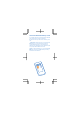
Keys and parts Important: For important info on the safe use of your device and battery, read “Safety” and “Product and safety info” in the device user guide at www.nokia.com/support and in the in-device user guide before you take your device into use. Select Nokia Care. 1 2 3 4 5 6 7 8 9 Earpiece Volume keys Power/Lock key Microphone Antenna areas Camera Audio connector 3.
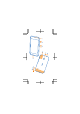
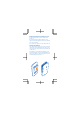
Get started Before you start using your phone, remove the back cover to insert the micro-SIM card (also known as the mini-UICC card). Remove the back cover Make sure the phone is switched off. 1. At the top of the phone, put your fingernails in the seam between the screen frame and the back cover. Do not use any sharp tools, as they may damage the phone. 2. Place your thumb in the middle of the back cover and bend the cover to remove it. 3. If the battery is in, lift it out from the upper right corner.
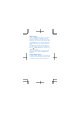
Insert the SIM and memory cards 1. Carefully slide the micro-SIM card into the SIM slot with the metal contact area down. 2. Slide the memory card into the memory card slot. Important: Your device uses a micro-SIM card, also known as a mini-UICC SIM card. Use of incompatible SIM cards, or use of SIM card adapters, may damage the card or the device, and may corrupt data stored on the card. Tip: For best performance, it is recommended that you use a fast 4–128GB memory card by a well-known manufacturer.
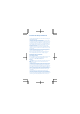
Replace the battery and back cover 1. Line up the battery contacts, and put the battery in. 2. Press the bottom edge of the back cover against the bottom edge of your phone, and snap the cover into place. 3. To switch your phone on, press the power key. Charge the battery Plug a compatible charger into a wall outlet, and connect the micro-USB end to your phone. You can also charge your phone from a computer with a USB cable.
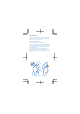
Help and tips There's a user guide in your phone – it's always with you, available when needed. Check out videos, find answers to your questions, and get helpful tips. On the start screen, swipe left, and tap Nokia Care. If you’re new to Windows Phone, check out the section for new Windows Phone users. To transfer contacts and text messages from your old phone, on the start screen, swipe left, and tap Transfer my Data. For more info, see the Nokia Care app.
Product and safety information For info on Microsoft Mobile Service terms and Privacy policy, go to www.nokia.com/privacy. You can only use your device on the WCDMA 850, 900, 1900, 2100; and GSM 850, 900, 1800, 1900 MHz networks. Use your device only with an original BL-5J rechargeable battery. Do not dispose batteries as household waste. Charge your device with AC-18U charger. Charger plug type may vary. Microsoft Mobile may make additional battery or charger models available for this device.
hearing health professional. For more info about accessibility, go to www.nokiaaccessibility.com. Nickel The surface of this device is nickel-free. Information on health The U.S. Food and Drug Administration (FDA) and the U.S. Federal Communications Commission (FCC) published statements and questions and answers concerning cellular telephones and health. Microsoft Mobile encourages you to visit these websites for updated information. You can access the FDA website at www.fda.
guidelines incorporate substantial safety margins that are intended to assure the protection of all persons regardless of age and health. The exposure guidelines are based on the Specific Absorption Rate (SAR), which is an expression of the amount of radio frequency (RF) power deposited in the head or body when the device is transmitting. The ICNIRP SAR limit for mobile devices is 2.0 W/kg averaged over 10 grams of tissue.
changes could affect SAR values. The latest available SAR information for this and other Nokia device models can be found at www.nokia.com/sar. For more info, go to www.sar-tick.com. Note that mobile devices may be transmitting even if you are not making a voice call. The World Health Organization (WHO) has stated that current scientific information does not indicate the need for any special precautions when using mobile devices.
Microsoft Mobile does not make any representations, provide a warranty, or take any responsibility for the functionality, content, or end-user support of third-party apps provided with your device. By using an app, you acknowledge that the app is provided as is. To access the Windows Phone software license terms, select Settings > about. Please read the terms. Please note that by using the software, you accept the terms. If you do not accept the terms, do not use the device or software.
that related to promotional, internal, and commercial uses, may be obtained from MPEG LA, LLC. See www.mpegla.com. Manufacturer and warranty info Microsoft Mobile Oy (Ltd) has purchased the devices and services business from Nokia. The manufacturer of this product is Microsoft Mobile Oy (Ltd) or any of its affiliates, even if “Nokia Corporation” or any of its affiliates may still be visible in the sales package, documentation, or the product itself.
may be, additional rights, within the limits of what is permissible under such law, and does not limit the rights you may have under applicable statutory product warrantee provisions. You may have other rights based on local laws during or after the Warranty period. These rights are not excluded by this Warranty. 2.
party services or enabling clients even if preinstalled by MMO (please read the terms and conditions that may accompany the services as those will define your rights and obligations); 3 Any (i) normal wear and tear, (ii) reduced charging capacity of the battery resulting from its natural end of product life, or (iii) pixel defects in your Product’s display that are within the scope of industry standards; 4 SIM card and/or any cellular or other networks or system on which your Product operates; or 5 Errors o
The limitations in this clause 4 shall not apply in case of MMO’s negligence or intentional misconduct or in case of death or personal injury resulting from MMO’s proven negligence. 5. OTHER IMPORTANT NOTICES For further information on your Warranty, as well as information needed to process your warranty queries, please visit www.nokia.com.