
User Manual





Media
39
Media
Video editor
To create custom video clips, press and select Media→ Vid. editor. You can create
custom video clips by combining and trimming video clips, and adding sound clips,
transitions, and effects. Transitions are visual effects that you can add in the beginning and
end of the video or between the video clips.
Editing video, sound, and transitions
1 Mark and select one or more video clips.
2 Select Options→ Edit. In the Edit video view, you can insert video clips to make a
custom video clip, and edit the clips by trimming and adding effects. You can add sound
clips and change their duration.
To modify the video, select one of the following options:
Preview - Previews the custom video clip.
Insert :
• Video clip - Inserts the selected video clip. A thumbnail of the video clip is shown in
the Main view. A thumbnail consists of the first non-black view of the video clip. The
name and length of the selected video clip is also shown.
• Sound clip - Inserts the selected sound clip. The name and length of the selected
sound clip is shown in the Main view.
• New sound clip - Records a new sound clip to the selected location.
Cut - Trims the video clip or a sound clip in the Cut video clip or in the Cut sound clip
view.
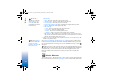
Fig. 7 The Edit video
view, where the
selected transition is
set to Dip to black.
R0915_en.book Page 39 Wednesday, September 15, 2004 12:14 PM