
User Manual





[ 67 ]
11
Setup voicemail with dialing codes
1 At the Start screen, press Names, scroll to 1-touch dialing, and press
Select.
2 Scroll to an empty 1-touch dialing slot and press Assign.
3 Enter your voice mailbox number, including the area code.
4 Refer to the dialing codes table above and enter any codes as
necessary along with the information that you wrote down earlier.
For example, if you have to pause for 5 seconds after connection to
voicemail, enter p twice (after the voice mailbox number).
Example: 2145551212pp
5 Enter any remaining pauses, PIN codes, and other informaiton that
allows you to listen to your messages and press OK.
6 Enter a name (such as Voicemail) and press OK. A message appears in
the display confirming your 1-touch dialing location has been saved.
Now to dial and listen to your voicemail, just press and hold the
assigned 1-touch dialing key at the Start screen. No other keypresses
should be necessary.
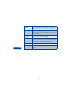
* Bypasses a set of insturctions
+ Preceeds an international tepephone number
p Pauses for 2 1/2 seconds before sending any numbers that follow
w Wait Your phone waits for you to press (call) before it saends any
following numbers.