
User Manual



9
[ 48 ]
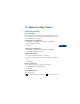
• CLEAR CALL LISTS
This feature clears all the missed, received, and dialed call lists.
Caution: You cannot undo this operation.
1 Press Menu 2 4 (Call log > Clear call lists).
2 Scroll to All, Missed, Dialed, or Received, then press Select.
Caution: Missed, received, and dialed calls lists are also erased
when you change the phone security setting, or if you use a SIM card
that is not one of the five most recent cards used with the phone.
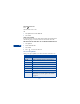
• USE CALL TIMERS
Your phone automatically tracks the amount of time you’ve spent on calls.
View the call duration
1 Press Menu 2 5 (Call log > Call timers).
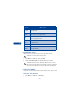
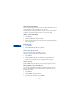
Send
message
Allows you to write a short text message to the person
who called you.
Edit
number
Allows you to edit the displayed number and save it
with a name to your phone book.
Save
Allows you to enter a name for the number and save
both to your phone book.
Add to
name
Allows you to save the number to an existing name in
the phone book.
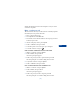
Erase Allows you to delete the number from the call list.
View
number
Displays the phone number is the caller’s name is stored
in the phonebook.
Choice What it does