
User Manual



9
[ 46 ]
9 Check call history
Your phone provides a call log that registers information about calls you
make and receive. The call log keeps track of the following:
• Missed calls.
• Numbers from which you’ve received
calls.
• Numbers you’ve dialed.
• The amount of time you’ve spent on
calls.
• The amount of data sent and received over GPRS.
• The amount of time you’ve spent online for data transfers over GPRS.
• CHECK DIALED CALLS
Your phone saves the last 10 numbers you’ve dialed.
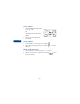
1 Press Menu 2 3 (Call log > Dialed numbers).
2 Scroll to the number you want to see.
3 To dial the number, press ; for other options, press Options
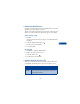
(see “Choose options in call lists” on page 47).
• CHECK RECEIVED CALLS
Your phone saves the phone numbers of the 10 most recent calls you’ve
answered, if the caller’s number was available.
1 Press Menu 2 2 (Call log > Received calls).
2 Scroll to the number you want to see.
3 To dial the number, press ; for other options, press Options
(see “Choose options in call lists” on page 47).