
User Manual



[ 41 ]
8
8 Use the phone book
Use the phone book to store names, e-mail addresses and phone numbers.
• A phone book entry can consist of a number only, a name and number,
or a name only.
• Names are saved in the phone book memory and/or SIM memory. If
you try to save a name that already exists, the phone asks if you want
to replace the existing name.
• SAVE NAMES, NUMBERS, AND E-MAIL ADDRESSES
Save a name, number, and e-mail address
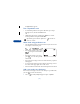
1 Enter a phone number and press Options.
Note: For international dialing, see page 63.
2 Scroll to Save and press Select.
3 Enter a name, then press OK.
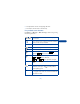
4 Press Options.
5 Scroll to Add info and press Select.
6 Scroll to E-mail and press Select.
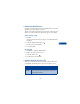
7 Enter the e-mail address, then press OK.
Note: All phone book entries that contain email addresses are
automatically saved in phone memory. E-mail addresses cannot
be saved in SIM memory.
Save a number only
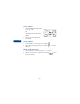
1 Enter the phone number.
2 Press and hold Options.
The number is saved in your phone book. You can add a name or e-mail
address to it later.