
User Manual




6
[ 22 ]
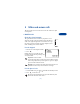
Scroll bar
While you use your phone’s menus, a scroll
bar appears at the far right of the screen.
This bar indicates where you are in the menu.
Each numbered “tab” on the bar represents
a different menu item.
For example, press Menu once. The scroll bar
appears with the first (top) tab displayed. A different tab appears each
time you press or .
Help text
Many menu items have brief help text. To view the help text, scroll to the
menu item and wait for about 15 seconds. Press More to see the next
page of the text or Back to exit.
• ABOUT MENU SHORTCUTS
When you scroll to a menu item, the menu
number appears on the screen above the
scroll bar. If you learn some of these menu
numbers, you can use them to access
different features quickly instead of
scrolling through the menu.
• To use a shortcut, press Menu, then the menu number.
• For access to the Messages Menu, press Menu, then 0, then the menu
number(s).