
User Manual




[ 127 ]
17
Warning: Your phone must be switched on to use this function.
Do not switch on the phone when wireless phone use is prohibited
or when it may cause interference or danger.
Add, subtract, multiply and divide
1 Press Menu 7 1 (Tools > Calculator).
2 Enter the first number in the calculation.
• Press to enter a decimal point and press Clear to erase any
mistakes.
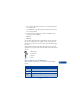
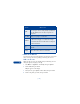
• To add, press once (+ appears)
• To subtract, press twice (- appears)
• To multiply, press three times (∗ appears)
• To divide, press four times (/ appears)
3 Enter the second number, repeating steps as needed.
4 Press Options. Equals is selected.
5 Press Select.
Convert currency
SET THE EXCHANGE RATE
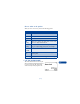
1 Press Menu 7 1 (Tools > Calculator), then press Options.
2 Scroll to Exchange rate, then press Select.
3 Scroll to Home units converted to foreign units or Foreign units
converted to home units.
4 Press Select.
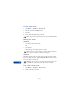
5 Enter the exchange rate (press to enter a decimal point).
6 Press OK.