
User Manual




[ 125 ]
17
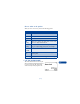
4 Take a lap time by pressing Lap.
The clock stops, then starts immediately from zero.
The lap time appears below the running time.
If you take more than one lap time, the new measured time appears at the
beginning of the list. You can scroll to see previous measured times.
Stop the clock
Press Stop to end the time measurement.
Save the time
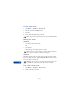
1 While the clock is running, press Stop, then Options.
2 Scroll to Save, enter a name for the measurement, then press Select.
If a name is not entered, the total time is used as a title.
Choose other stopwatch options
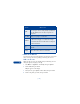
You can choose the following options when using the Stopwatch.
Choice What it does
Continue Shows up when the Stopwatch is working in the
background.
Show last
time
Allows you to view the last measured time.
View times Allows you to browse the saved times.
Erase times Allows you to delete the saved times. You can delete
the saved times one by one or all at once.