
User Manual




17
[ 124 ]
• USE THE STOPWATCH
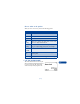
Your phone has a stopwatch that can be used to track time at sporting
events or other occasions. The stopwatch displays time in hours, minutes,
seconds and fractions of a second. 00:00:00:0
Measure time
1 Press Menu 10 4 (Extras > Stopwatch).
2 Scroll to Split timing, then press Select.
3 Press Start.
The running time appears on the display.
Measure split time
You can use the split time function at a long distance race when you need
to pace yourself.
1 Press Menu 7 5 (Tools > Stopwatch).
2 Scroll to Split timing, then press Select.
3 Press Start.
4 Take an intermediate time by pressing Split.
The clock continues to run.
The split time appears below the running time.
If you split the time more than once, the new measured time appears at
the beginning of the list. You can scroll to see previous measured times.
Measure lap time
You can use the lap time function when you want to track how long it
takes to complete each cycle or lap.
1 Press Menu 7 5 (Tools > Stopwatch).
2 Scroll to Lap timing, then press Select.
3 Press Start.
The running time appears on the display.