
User Manual




[ 121 ]
17
Choose other to-do options
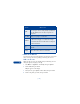
When you view a to-do note, you have the following options:
• USE THE ALARM CLOCK
The alarm clock feature is based on your
phone’s internal clock and sounds an alert
at a time you specify. The alarm clock
works even if you turn your phone off.
Choice What it does
View Allows you to view the selected note.
Erase Allows you to delete a note.
Edit Allows you to modify the contents of a note.
Edit
priority
Allows you to change the priority level of a note. Your
choices are high, medium and low.
Go to
priority
Allows you to view notes for a certain priority level. You
can go to only the high priority notes, for example.
Save to
calendar
Allows you to save the to-do note as a calendar note.
Send as
text
Allows you to send the note as a text message to
another phone.
Dictionary Allows you to enter letters using predictive text input.