
User Manual



16
[ 116 ]
Set up an automatic connection
If the network supports an automatic connection, you can choose to have the
GPRS context created as soon as you turn your phone on. The connection
stays on in the background all the time, as long as you have network coverage.
You can take advantage of this continuous connection when browsing the
Internet. When you are finished browsing, the connection stays active for
quick access the next time you need to download information.
You can choose one of the following options from the Services settings
menu:
• Always online: the connection is established when you turn your
phone on. The connection continues in the background even after
you are finished browsing, depending on network coverage.
• When needed: the connection is established when you use your WAP
browser and is closed when you end the browsing session.
Receive a call while online
If you are using the WAP browser over GPRS, you can still receive a voice
call. Your data call is put on hold and you can choose to answer the call.
• To answer the incoming call, press .
• To reject the incoming call, press .
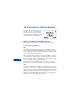
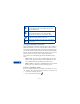
Shows up in the left upper corner of the screen. Indicates
an active GPRS connection, for example, when you are
using the WAP browser.
Shows up in the left lower corner of the screen, under the
signal strength bars. Indicates a continuous GPRS
connection, if you chose the “always online” setting.
Indicates that circuit switched (CS) or voice calls are not
possible when using GPRS for a data call.
Indicates that the GPRS connection has been interrupted
by a voice call.