
User Manual



16
[ 112 ]
• USE BROWSER OPTIONS
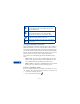
The Services menu gives you the options shown in the following list.
Some service providers may have customized the options on the Services
menu. Contact your service provider for more information if any of the
options shown here are not available.
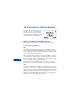
• NAVIGATE THE WIRELESS INTERNET
Since your phone’s screen is much smaller than a computer screen, Internet
content is displayed in a different format than you may be used to seeing.
This section shows simple guidelines for using the phone’s keys to navigate
a WAP site. Examples of how to read a WAP site follow the guidelines.
Choice What it does
Home Starts the browser and takes you to your service
provider’s home page.
Bookmarks Shows a list of all saved bookmarks. Bookmarks help
you find a WAP site quickly.
Service
inbox
Allows you to receive notifications from your service
provider. Notifications may be about new email
messages, changes in stock prices or news headlines.
Settings Provides options for changing connection settings,
appearance settings, and authority certificate.
Go to
address
Accepts an address you enter.
Clear cache Empties the browser’s temporary memory and frees up
space. It’s advisable to empty your cache at the end of
each session.