
User Manual



15
[ 104 ]
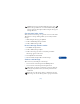
• STORE MESSAGES
The inbox and outbox share a given amount of memory in your SIM card.
When this memory is full and there is no more room to store messages,
the message indicator blinks. If you are sent a text message when the
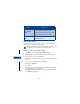
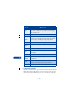
Reply
Allows you to choose templates, use standard replies
“Yes,” “No,” “Thank you,” or compose your own reply
from a blank screen.
Chat
Use
number
Allows you to extract numbers from the current message.
The phone goes through and gathers all phone numbers
in the message, including the originating address.
Forward Allows you to send the message to another recipient.
Forward
options
Allows you to send your message to many recipients.
Edit Allows you to modify the message.
Move
Allows you to move the message to the Outbox or Archive,
for example.
Rename Allows you to enter a new title for the message.
Copy to
calendar
Copies the message to your phone’s calendar as a
reminder note.
Details
Shows, for example, the sender’s name and phone number,
message center used, reception date and time.
Font size Allows you to choose a small or large font size.
Choice What it does