
User Manual



15
[ 102 ]
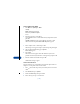
FROM THE MESSAGES MENU
1 Press Menu 01 2 (Messages > Write
e-mail).
Write e-mail appears briefly,
followed by the Edit recipient
screen.
2 Enter the recipient’s e-mail address,
or press Find to retrieve an email address from your phone book, and
press OK.
The Edit recipient box appears again. Edit the recipient’s e-mail
address if needed and press OK. The Edit subject box appears.
3 Enter a subject for the e-mail and press OK.
The message screen appears. Compose your message using the keypad
4 Once you have finished writing, press Options.
Send e-mail appears.
5 Press Select.
The email srever box appears. Enter the number for your service
provider’s email server (also known as “email gateway”) and press OK.
6 Enter the E-mail server number and press OK.
Confirmation messages appear.
FROM THE PHONE BOOK
First you must have an e-mail address entered into the phone book. See
Chapter 8 “Use the phone book” for more details.
1 Press , then scroll to the person you to whom you want to send an
email.
2 Press Details, then press Options.
3 Scroll to Send message, then press Select.
4 Enter a message of up to 160 characters.