
User Manual




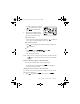
Table Of Contents
- Nokia 8890 User Guide
- Contents
- For Your Safety
- 1. Welcome
- 2. Before You Begin
- 3. About Your Phone
- 4. How to make and answer calls
- 5. The menu
- 6. Entering letters and numbers
- 7. Phone book
- 8. Voice Mail
- 9. Profiles
- 10. Advanced calling features
- 11. Customizing your phone
- 12. Security features
- 13. How to select a system
- 14. Text messages
- 15. Your Personal Digital Assistant
- 16. Your phone and other devices
- 17. Fun and games
- 18. Reference Information
- 19. Techical information
- 20. Troubleshooting
- 21. Frequently Asked Questions (FAQ)
- Nokia One-Year Limited Warranty

[ 82 ] 8890 User Guide v8 11/30/99
• To insert a symbol, press and hold
. The symbol screen appears.
Select the desired symbol and
press
,OTFSU
.
2 When you have finished writing,
check that the underlined word is
the word you intended to write.
If the word is correct:
• Insert a punctuation mark, if needed. Then press to confirm it
enter a space, and begin writing the next word.
If the word is not correct:
• Press repeatedly until the desired word appears, then press
to confirm it.
OR
• Press
2QUJPOT
, scroll to
0ATCHES
, then press
2.
.
Scroll to the correct word and press
8TF
.
• Start writing the next word.
Note: When you enter a period to end a sentence, the phone switches
to mode so the that the first letter in the next word will be
uppercase.
If the ? character appears after the word:
The word you intended to write is not in the dictionary.
• To add the word to the dictionary press
6QFMM
. See “Adding the
desired word to the match list.”
Adding the desired word to the match list
If no matches are found in the predictive text input mode, you can add
the word to the dictionary.
1 Press repeatedly until
6QFMM
appears in place of
2QUJPOT
.
8890ug.book Page 82 Tuesday, November 30, 1999 3:39 PM