
User's Guide


Table Of Contents
- 1 Safety first
- Road safety comes first
- Be aware of interference
- Switch off in hospitals
- Switch off in aircraft
- Switch off when refueling
- Switch off near blasting
- Use your phone sensibly
- Observe infrared precautions
- Use only qualified service personnel
- Use approved accessories and batteries
- Keep your phone dry
- Backup copies
- Connecting to other devices
- Read instructions before you connect to other devices
- Make calls
- Make emergency calls
- 2 Welcome
- 3 Review the basics
- 4 Set up your phone
- 5 Add information
- 6 Use the phone book
- 7 Check call history
- 8 Use advanced calling features
- 9 Use voice mail
- 10 Personalize rings and tones
- 11 Personalize phone settings
- 12 Manage phone security
- 13 Your personal digital assistant
- 14 Use prepaid services
- 15 Set network services features
- 16 Communicate with text messages
- • About text messages
- • Use folders for text messages
- • Write and send a text message
- • Resend a message from the outbox
- • Receive a text message
- • Read a text message
- • Save a message in the archive folder
- • When your phone’s memory is full
- • Erase messages
- • Reply to a message
- • Forward a message
- • Send and receive e-mail messages
- • Reply to or forward an e-mail message
- • Receive an e-mail message
- • Use templates
- • Picture messages
- • Chat with other phone users
- 17 Use special features
- 18 Infrared
- 19 Connect to the Internet
- 20 Play games
- 21 Frequently asked questions (FAQ)
- 22 Glossary
- 23 Reference information
- 24 NOKIA One-Year Limited Warranty
- 6360 .1_title(1).pdf
&21),'(17,$/
6360 User Guide Draft [ 85 ] 14 May 2001
Personalize phone settings
11
• Equalizer
• Ability to send and receive short text messages
•E-mail
• Convenience of one-touch dialing
• Vibrating alert for incoming calls and messages
TTY/TDD capable
This feature makes the phone more user friendly for hearing-impaired
users. The TTY connection is available.
EQUIPMENT YOU’LL NEED
To send and receive messages using a TTY or TDD device, you will need the
following equipment (in addition to your phone):
• A TTY/TDD device that is “cellular ready” or “cellular compatible”
• A connector cable, usually supplied with the TTY/TDD device
• The Nokia TTY/TDD cable HDA-8 Phone Adapter, which can be
purchased as an accessory
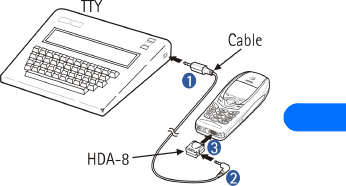
Connect to the TTY/TDD hardware
How to connect the phone to
the TTY:
1 Connect the cable to the
TTY machine
2 Connect the adaptor to the
cable
3 Connect the phone to the
adaptor
Make a call with TTY/TDD
1 At the Start screen, press Menu 4-5-3-1 (Settings > Accessory
settings > TTY > TTY on)
2 Dial the number on the phone