
User's Guide



Table Of Contents
- 1 Safety first
- Road safety comes first
- Be aware of interference
- Switch off in hospitals
- Switch off in aircraft
- Switch off when refueling
- Switch off near blasting
- Use your phone sensibly
- Observe infrared precautions
- Use only qualified service personnel
- Use approved accessories and batteries
- Keep your phone dry
- Backup copies
- Connecting to other devices
- Read instructions before you connect to other devices
- Make calls
- Make emergency calls
- 2 Welcome
- 3 Review the basics
- 4 Set up your phone
- 5 Add information
- 6 Use the phone book
- 7 Check call history
- 8 Use advanced calling features
- 9 Use voice mail
- 10 Personalize rings and tones
- 11 Personalize phone settings
- 12 Manage phone security
- 13 Your personal digital assistant
- 14 Use prepaid services
- 15 Set network services features
- 16 Communicate with text messages
- • About text messages
- • Use folders for text messages
- • Write and send a text message
- • Resend a message from the outbox
- • Receive a text message
- • Read a text message
- • Save a message in the archive folder
- • When your phone’s memory is full
- • Erase messages
- • Reply to a message
- • Forward a message
- • Send and receive e-mail messages
- • Reply to or forward an e-mail message
- • Receive an e-mail message
- • Use templates
- • Picture messages
- • Chat with other phone users
- 17 Use special features
- 18 Infrared
- 19 Connect to the Internet
- 20 Play games
- 21 Frequently asked questions (FAQ)
- 22 Glossary
- 23 Reference information
- 24 NOKIA One-Year Limited Warranty
- 6360 .1_title(1).pdf
&21),'(17,$/
3
6360 User Guide Draft [ 12 ] 14 May 2001
• ABOUT THE ANTENNA
Your phone has a built-in antenna. As with any
other radio transmitting device, do not touch the
antenna unnecessarily when the phone is in use.
Contact with the antenna affects call quality and
may cause the phone to operate at a higher power
level than otherwise needed.
Hold the phone to your ear, placing your finger tips on the ridge of the
battery cover, which is located below the antenna area on the back of
your phone.
If the phone becomes too hot during a call, the call is
automatically terminated. You won’t be able to make or receive
calls until the phone cools.
• ABOUT THE BATTERY
Install the battery
If your dealer has already installed the battery, please see “Charge the
battery” on page 14.
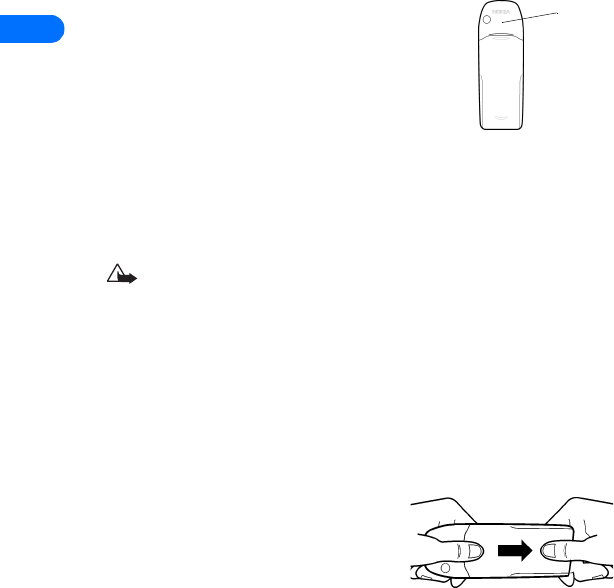
1 If cover is already on phone, remove
the back cover of the phone by
gripping the bottom with one thumb
and pressing downward with the other
thumb. Slide the cover toward the
bottom of the phone and remove it.
Antenna