User Guide Wireless Charging Plate DT-903 Issue 1 EN
User Guide Wireless Charging Plate DT-903 Contents Safety 3 About your accessory 4 Keys and parts 5 Charge your phone 6 Get notifications 7 About Bluetooth connectivity 8 Indicator lights and multifunction key actions 9 Product and safety info 10 Copyrights and other notices 11 © 2014 Microsoft Mobile. All rights reserved.
Safety Read these simple guidelines. Not following them may be dangerous or illegal. INTERFERENCE All wireless devices may be susceptible to interference, which could affect performance. QUALIFIED SERVICE Only qualified personnel may install or repair this product. BATTERIES, CHARGERS, AND OTHER ACCESSORIES Use only batteries, chargers, and other accessories approved by Microsoft Mobile for use with this device. Do not connect incompatible products. KEEP YOUR DEVICE DRY Your device is not water-resistant.
About your accessory With the Wireless Charging Plate DT-903, you can charge the battery of your phone without connecting any cables to your phone. Your wireless charging plate can also let you know, for example, when the battery on your phone is running low, or when you’ve missed a call or you have unread messages. Your wireless charging plate is compliant with the Qi standard. The NFC feature works with Nokia Lumia devices that support NFC.
Keys and parts Get to know your wireless charging plate. 1 2 3 4 5 USB connector Charging area for charging the phone NFC area Multifunction key Charging and notification indicator light The surface of this product is nickel-free. © 2014 Microsoft Mobile. All rights reserved.
Charge your phone It’s simple: place your phone or another Qi-compatible device on the charging plate to start charging. 1. Connect the USB cable of your charging plate to a compatible charger plugged into a wall outlet, or to another suitable USB power source. 2. Make sure the charging plate is facing up and there's nothing on the plate. 3. Place your phone on the charging plate. The indicator light is on when a phone is being charged, and fades out when the phone’s battery is full.
Get notifications To get notified about a low charging level on your phone, or about missed calls or messages, among other things, pair your charging plate with your phone using NFC or Bluetooth. Make sure your charging plate is connected to a power source. For more info on how to switch NFC or Bluetooth on, see your phone's user guide. 1. When using NFC, touch the NFC areas of your charging plate and phone together, and follow the instructions shown on the phone.
About Bluetooth connectivity You can use Bluetooth to connect wirelessly to other compatible devices, such as mobile phones. The devices don't have to be in direct line of sight, but they must be within 10 metres (33 feet) of each other. The connection may be affected by obstructions such as walls or other electronic devices. This device is compliant with Bluetooth Specification 4.0. Check with the manufacturers of other devices to determine their compatibility with this device. © 2014 Microsoft Mobile.
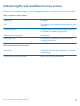
Indicator lights and multifunction key actions Wonder what the different lights on your charging plate mean or what the multifunction key does? Table 1: Indicator light patterns Continuous Charging Off The battery of your phone or other device is fully charged Flashing quickly Charging error, or the connected power source is not able to provide enough power Flashing twice repeatedly Notification Flashing slowly The battery of the phone connected to the charging plate is low Table 2: Multifunction
Product and safety info Take care of your device Handle your device, charger and accessories with care. The following suggestions help you keep your device operational. • • • • • • • • • • Keep the device dry. Precipitation, humidity, and all types of liquids or moisture can contain minerals that corrode electronic circuits. If your device gets wet, let the device dry. Use the charger for intended purposes only.
Copyrights and other notices DECLARATION OF CONFORMITY Hereby, Microsoft Mobile Oy declares that this DT-903 product is in compliance with the essential requirements and other relevant provisions of Directive 1999/5/EC. A copy of the Declaration of Conformity can be found at www.nokia.com/global/ declaration/declaration-of-conformity. The availability of products may vary by region. For more info, contact your dealer.