User Guide Nokia Wireless Charger DT-601 Issue 1 EN
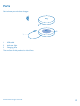
Parts Get to know your wireless charger. 1 2 3 USB cable Indicator light Charging area The surface of this product is nickel-free. © 2013 Nokia. All rights reserved.
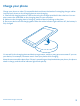
Charge your phone Charge your phone or other Qi-compatible device without the hassle of untangling charger cables. Just pop your phone on the charging plate to start charging. 1. Connect the charging plate to a wall outlet using the charger provided in the sales box. You can also connect the USB cable on the charging plate to your computer. 2. Make sure the charging plate is facing up, and that there's nothing on the plate. 3. Place your device on the charging plate.
About Qi Qi is a global standard that makes wireless charging possible for your device. Qi works using magnetic induction, and is currently designed for devices that use 5 watts of power or less, such as mobile phones. Qi chargers and devices use the same frequency. As long as their charging areas are touching, all Qi products are compatible, regardless of manufacturer or brand. For more details, see the user guides of the relevant devices. © 2013 Nokia. All rights reserved.
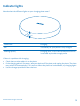
Indicator lights Wonder what the different lights on your charging plate mean? Continuous Charging Off The battery of your phone is fully charged Flashing quickly Charging error, or the connected power source is not able to provide enough power If there is a problem with charging: • • • Check that no other object is on the plate. If the charging plate is too warm, take your device off the plate, and unplug the plate. The plate may switch off automatically if it is too hot.
Troubleshooting and support When you want to learn more about your device, or if you're unsure how your device should work, there are several support channels for you to check. To help you get the most out of your device, you can explore www.nokia.com/support.
Product and safety information Take care of your device Handle your device, charger and accessories with care. The following suggestions help you keep your device operational. • • • • • • • • • • Keep the device dry. Precipitation, humidity, and all types of liquids or moisture can contain minerals that corrode electronic circuits. If your device gets wet, let the device dry. Use the charger for intended purposes only.
Copyrights and other notices DECLARATION OF CONFORMITY Hereby, NOKIA CORPORATION declares that this DT-601 product is in compliance with the essential requirements and other relevant provisions of Directive 2004/108/EC. The availability of products may vary by region. For more info, contact your Nokia dealer. This device may contain commodities, technology or software subject to export laws and regulations from the US and other countries. Diversion contrary to law is prohibited.
Warranty The warranty period Nokia provides for this product is 12 months. For details please visit the local Nokia online warranty text web site www.nokia.com/support. © 2013 Nokia. All rights reserved.