
Owner`s manual





Mercury Mambo Micro Powerchair Owner’s Handbook (Page 9) Part code: Z20943-00
7 Bar
A joystick fault is indicated. Make sure that the joystick is in the centre
position before switching on the control system.
8 Bar
A control system fault is indicated. Make sure that all connections are
secure.
9 Bar
The parking brakes have a bad connection. Check the parking brake and
motor connections. Make sure the control system connections are secure.
10 Bar
An excessive voltage has been applied to the control system.
This is usually caused by a poor battery connection. Check the battery
connections.
10 Bar +
Speed
This is where the Speed Indicator and 10 bars are lit.
A communication fault is indicated. Make sure that joystick cable is
securely connected and not damaged.
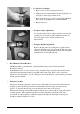
Freewheel Device
• Push the lever down to put the device in to
‘freewheel’. Repeat this for the other motor, and
the powerchair can be pushed.
• Pull the lever up to put the device in to ‘drive’.
Repeat for the other motor and the powerchair can
be driven by the joystick.
N
Warning
Do not set in freewheel mode when driving on a gradient.
Always re-engage the freewheel lever to ‘DRIVE’ before use.
Failure to do so may result in injury.
• Armrest Width.
To adjust the width of the armrest, slacken the tristar knobs at the rear of the seat base. Slide the
armrests in and/or out to the desired width. Retighten the tristar knobs to secure.
• Rotating (swivelling) and removing the seat
The seat will rotate 360º in 45º intervals. To swivel the seat, push the swivel seat lever whilst
rotating the seat. Release the lever and carry on rotating the seat until it locks in position.
To remove the seat, firstly unplug the joystick controller. Then push the swivel lever whilst
rotating and pulling up on the seat.
F
Attention:
If you are rotating the seat more than 90º, ensure that you unplug the joystick controller.
Failure to do so could result in the joystick cable becoming entangled or damaged.