
Owner`s manual





Mercury Mambo Micro Powerchair Owner’s Handbook (Page 10) Part code: Z20943-00
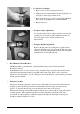
• To alter the seat height:
1. Remove the seat (as described previously)
2. Slacken the securement handle (shown by black arrow)
and remove the lock pin (white arrow).
3. Reposition the seat post to the correct height. Reinsert
the lock pin and retighten the securement handle.
4. Replace the seat.
• Footplate Angle Adjustment
To raise the angle of the footplate, turn the screw (shown
by white arrow) clockwise using an M6 hex wrench. To
lower the angle of the footplate, turn the screw
anticlockwise.
• Footplate Height Adjustment
Remove the nut and bolt securing the footplate bracket
(shown by black arrow) to the powerchair. Reposition the
bracket to the desired height and insert the bolt through the
predrilled hole. Secure using the nut.
• Reset Button (Circuit Breaker)
The Mambo Micro powerchair has a circuit breaker in the position shown in the Parts
Description section:
In the unlikely event of a short circuit or the powerchair being overloaded, the circuit breaker
will activate automatically and the powerchair will be shut down. If this occurs, wait a few
minutes for circuit breaker to recover. Then press the circuit breaker to reset and the powerchair
should operate normally.
• Using the Lap Belt
The lap belt should be adjusted to suit each user. The length of the belt can be adjusted by the
tri-glides on the belt. The lap belt fastens automatically when the clip is inserted in to the
receiver. To unfasten the lap belt, press the button in the centre of the receiver.
When fastened, the lap belt should be tight around the user’s pelvis without causing discomfort
or undue pressure. This will help keep the user’s hips and pelvis towards the back of the
powerchair. Use the tri-glides to adjust the length of the lap belt. The length of the lap belt
should be checked each time it is used.