
DVD PLAYER User's Guide MVDP1101





21
SETUP MENU (CONTINUED)
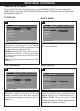
When this option is set to ON, Closed
Captions will appear on the screen for the
hearing impaired (if originally recorded on
the DVD). When this option is OFF, the
Closed Captions will not appear.
- - General Setup Page - -
On
O
ff
General Audio Dolby Video Preference
TV Display
Angle Mark
OSD Lang
Spdif Output
Captions
S
creen Saver
Closed Caption
General
- - General Setup Page - -
On
Off
General Audio Dolby Video Preference
TV Display
Angle Mark
OSD Lang
Spdif Output
Captions
Screen Saver
Screen Saver
General
1
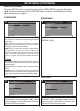
When this option is set to ON, the screen
saver will come on when the unit stops or
the image is paused for approximately 3.5
minutes.
When this option is OFF, the screen saver will
not come on.
- - General Setup Page - -
On
Off
General Audio Dolby Video Preference
TV Display
A
ngle Mark
OSD Lang
S
pdif Output
Captions
Screen Saver
Screen Saver
General
1
CAPTIONS
SCREEN SAVER
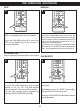
LT/RT: Select to hear the sound in theatrical
downmix mode.
STEREO: Select to hear the sound in
Stereo downmix mode.
- - Speaker Setup Page - -
Lt/Rt
Stereo
General Audio Dolby Video Preference
Downmix
Set Downmix Mode
General
1
DOWNMIX
AUDIO SETUP MENU:
Press the SETUP button to enter the menu, select AUDIO SETUP using the Navigation (√,®)
buttons, then press the PLAY/ENTER button to select it. Select/change the Setup option as
described on page 19.