
Manual






[]
M
[]
[]
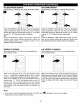
Press the STANDBY ON/OFF button to turn on the unit; the 1 Press the OPEN/CLOSE button to open the disc tray,
STANDBY indicator will go out and the POWER ON / "OPEN" will appear on the screen. Insert a picture disc with
indicator will light. 1 the label side facing up on the disc tray.
M
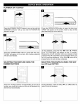
Press the OPEN/CLOSE button O to close the disc tray.
"LOADING" will appear on the TV screen. After loading, the
picture will automatically show on the TV screen. Press the
Skip (_) or (_) button • to select a picture.
The unit will playback all the pictures on the disc, then the
last picture will remain on the TV screen. If the screen saver
option is set to on, the screen saver will turn on in about
one minute.
TO STOP PICTURE CD FUNCTION: To stop playback of the picture CD, press the STOP (m) button.
29