
Manual






PLAYBACK OF A CD/VCD
NI
[]
[]
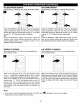
Press the STANDBY ON/OFF button to turn on the unit; the 1 Press the OPEN/CLOSE button to open the disc tray,
STANDBY indicator will go out and the POWER ON/ "OPEN" will appear on the screen. Insert
a d sc w the
indicator will light. 1 abe s de fac ng up on the d sc tray.
H
\
Press the OPEN/CLOSE button to close the disc tray.1
"CLOSE" will appear on the screen. After loading, playback/
/
will start automatically. /
J
SELECTING TRACKS/FILES USING THE
NUMBER BUTTONS
H
OOOO
OOOO
OOO
U
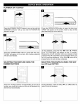
To stop playback, press the Stop (m) button O; "PRESS
PLAY TO CONTINUE" will appear on the TV screen.
Because the unit will remember where you stopped, simply
press the Play (1_) button O to resume playback where you
left off (resuming playback). If the Stop (i) button O is
)ressed twice, the unit will stop completely.
SELECTING TRACKS/FILES USING THE SKIP
(_,_) OR (_) BUTTON
U
DDDD
DDD
D_ D
Press the number buttons corresponding to the track During playback, press the Skip (m,._) or (i,e4) button to
number you would like to play, and the unit will playback the select a track to be played.
desired track automatically.
26