
Manual






PLAYBACK OF AN MP3 CD
[]
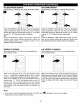
Press the STANDBY ON/OFF button to turn on the unit; the 1 Press the OPEN/CLOSE button to open the disc tray,
STANDBY indicator will go out and the POWER ON[ "OPEN" wilt appear on the screen. Insert an MP3 disc with
indicator will light. 1 the label side facing up on the disc tray.
M M
D_D
h,,
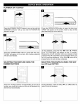
Press the OPEN/CLOSE button O to close the disc tray.
"CLOSE" will appear on the screen and the display. After
loading, the FOLDER/TRACK menu will appear on the TV
screen. Press the NAVIGATION (A,T) button @ to select
the desired folder/file.
Press the ENTER button O to confirm. If there are no
folders on the CD, playback will begin immediately. If there
are folders, then pressing the ENTER button O will bring up
the tracks in the right column. Press the Navigation (l_)
button @ followed by the Navigation (A,_') buttons O to
select the desired track, then press the ENTER button O to
play the track. Press the STOP (m) button O to stop
playback. To return to select another folder, while in the
Stop mode, press the Navigation (_1) button _, then press
the ENTER button O. The FOLDER/TRACK menu will
appear again on the TV screen.
24