
Manual


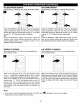




TITLE/CHAPTER SEARCH
Use this feature to directly go to a specific title and/or chapter.
DDDD
DDD
_D
0000
QQQQ
rh rh rh
Press the SEARCH button O once. Press the Navigation
(<,1_) buttons O to select the Title, then use the Number
buttons _) to select the desired title number (i.e. for number
5, press "0% "5"). Playback will start immediately.
OR
Press the Navigation (<,1_) buttons O to select the
Chapter, then use the Number buttons O to select the
desired chapter number (i.e. for number 2, press "0", "2").
Playback will start immediately.
TITLE/TIME SEARCH
Use this feature to directly go to a specific title and/or time.
[]
DDDD
DDD
_ooo
OQOQ
_, N rh
Press the SEARCH button O twice. Press the Navigation
(<,1_) buttons @ to select the Title, then use the Number
buttons _) to select the desired title number (i.e. for number
5, press "0% "5"). Playback will start immediately.
OR
Press the Navigation (4,1_) buttons O to select the Time,
then use the Number buttons O to select the desired time
(Hour/Minutes/Seconds); playback will start immediately.
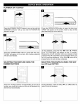
REPEAT PLAYBACK
While playing back a DVD, this unit can repeatedly play
back a chapter or title.
H
[]
A-B REPEAT PLAYBACK
While playing back a DVD, this unit can repeatedly play
back a specific section.
H
While in the Playback mode, press the REPEAT button
once; "O CHAPTER" will appear briefly on the TV screen
and the currently playing Chapter will repeat continuously.
While in the Playback mode, press the REPEAT button a
second time; "@ TITLE" will appear briefly on the TV
screen and the currently playing Title will repeat
continuously. Press the REPEAT button once more to
cancel Repeat mode; the Repeat indicator wilt disappear on
the screen.
While in the Playback mode, press the Repeat A-B button to
define where you want the section to start. Press the Repeat
A-B button again to define where you would like the section
to end, the unit will then play the selected area continuously.
Press the Repeat A-B button again to cancel A-B Repeat
mode.
NOTE:
• If you enter a time that exceeds the time limit of the DVD, then "_" will appear, and you must try again.
• Repeat may not work properly with some discs.
22