
Manual






AUDIO MODE (AUDIO CD/VCD/MP3 ONLY)
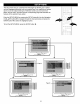
While playing an audio CD (not a DVD), you can cycle
between the audio modes as follows:
H
OOOO
Press the AUDIO MODE button to cycle through the audio
modes. The audio modes vary depending on the disc
inserted, but include MONO LEFT, MONO RIGHT, MIX-
MONO and STEREO.
"_"_" will appear if the disc does not support audio mode
changing.
MUTE
Press the MUTE button once to mute the sound, "MUTE" will appear on the TV screen. Press the MUTE button again to
restore the sound; "MUTE OFF" will appear briefly on the TV screen.
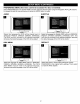
DISPLAY
Each press of the DISPLAY button will display the elapsed time and remaining time of a playing disc. Each press of the
DISPLAY button will cycle through, depending on the playback mode as follows:
DVD CD/VCD MP3
1st press Title Elapsed Time Track Elapsed Time Track Elapsed Time
2nd press Title Remaining Time Track Remaining Time Track Remaining Time
3rd press Chapter Elapsed Time Total Elapsed Time Off
4th press Chapter Remaining Time Total Remaining Time
5th press Off Off
NOTE: For VCD, if the PBC is on, the Total Elapsed Time and Total Remaining Time will not be available
19