
Manual






PARENTAL
The Parental option enables parents to prevent their children from watching inappropriate material on a DVD. It reads the
ratings for programming, then denies access to programming if the program's rating meets the limitations you select. In this
case, the user will have to enter a password.
o© O
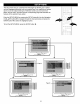
At the PREFERENCES MENU, use the Navigation (&,,)
buttons O to select PARENTAL. Press the I_ button @
followed by the Navigation ( A, •) buttons O to select the
desired rating.
1 (KID SAF): Kid Safe. 6 (R): Under 17 years
2 (G): All ages. old, Parental
3 (PG): Parental Guidance
Guidance. strongly
4 (PG13): Parental suggested.
Guidance less 7 (N017): 17 years old
than 13years old. and above.
5 (PGR): Under 17 years 8 (ADULT):Adult only.
old, Parental OFF: Parental Off
Guidance
suggested.
H
DDDD
DDD
[] _
D©©©
DOG©
DOG o
Press the ENTER button 0 to select the rating. Input your
password using the Number buttons @ (see note below),
then press the ENTER button O again. The desired rating
will then be set, and if DVDs with this new rating or above
are played, the user will require a password.
If an incorrect password is entered, access will not be
allowed.
If you forget your password, contact customer service at the
number listed in the Warranty.
NOTE: The default password is 1234.
PASSWORD
Select this option to change the password. You must know the old password in order to change it. If you have forgotten the
password, call customer service at the number listed in the Warranty.
o© O
! !
V.,m
N
oo0
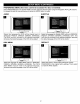
At the PREFERENCES MENU, use the Navigation (A,T)
buttons O to select PASSWORD. Press the 1,_button @to
select CHANGE.
Press the ENTER button O to change the password. Input
your old password (see note above), then the new password
and then confirm the new password using the Number
buttons @, then press the ENTER button O again. The
desired new password will then be set, be sure to write it
down for future reference.
18