
Manual


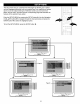




PREFERENCE MENU (this menu cannot be accessed if a disc is inserted):
Select PREFERENCES in the SETUP MENU and then select the desired option using the Navigation (<,1_, &, T) buttons
to navigate through the menus/screens and press the ENTER button to select.
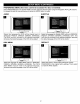
AUDIO SUBTITLE
[] []
Select the language the DVD wilt be played back in] [Select the language the Subtitle (OSD) willbe in (ENGLISH,]
(ENGLISH, FRENCH, SPANISH, GERMAN, JAPANESE)./ /FRENCH, SPANISH, GERMAN, JAPANESE, OFF). The /
The DVD must be recorded in the selected language,/ /DVD must be recorded in the selected language, otherwise /
otherwise the default language of the DVD will be played. I _the default language of the DVD will be shown. J
DISC MENU DEFAULT
I,II F
_oo O
Select the language the DISC MENU will be in (ENGLISH,
FRENCH, SPANISH, GERMAN, JAPANESE). The DVD's
DISC MENU must be made in the selected language,
otherwise the default language of the DVD will be shown.
[dl
Select this option to reset all the preferences (except
PASSWORD) to their original factory settings. This is useful
to reset the NTSC System.
17