
Manual


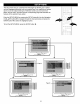




SPEAKER SETUP MENU:
Select SPEAKER SETUP in the SETUP MENU and then select the desired option using the Navigation (,4,1_, A, _')
buttons to navigate through the menus/screens and press the ENTER button to select.
DOWNMIX
Sets the Audio Output mode.
H F
LT/RT: Select to hear the sound in theatrical downmix
mode.
STEREO: Select to hear the sound in Stereo downmix
mode.
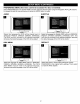
DOLBY DIGITAL SETUP MENU:
Select DOLBY DIGITAL SETUP in the SETUP MENU and then select the desired option using the Navigation (<,I_,A, _')
buttons to navigate through the menus/screens and press the ENTER button to select.
DUAL MONO
H f
STEREO: Select this to set the Dolby Digital output to
Stereo mode.
L-MONO: Select this to set the Dotby Digital output to left
mono mode, meaning it will reproduce the left mono signal
to the Left and Right channels.
R-MONO: Select this to set the Dolby Digital output to right
mono mode, meaning it will reproduce the right mono signal
to the Left and Right channels.
MIX-MONO: Select this to reproduce both channels mixed
together.
16