
Manual


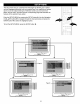




GENERAL SETUP MENU:
Select GENERAL SETUP in the SETUP MENU and then select the desired option using the Navigation (<,1_, &,,)
buttons to navigate through the menus/screens and press the ENTER button to select.
TV DISPLAY TV TYPE
H
\ / '
NORMAIJPS: Pan Scan. Select when the unit is connected to a
conventional TV. Video material formatted in the Pan Scan style
is played back in that style (the left and right edges are cut off).
NORMAL/LB: Letter Box. Select when the unit is
connected to a normal TV. Wide-screen images are shown
on the screen with a black band at the top or bottom.
WIDE: Select when the unit is connected to a wide-screen TV.
H
m
NTSC: Select when using an NTSC TV.
PAL: Select when using a PAL TV.
IMPORTANT: In the USA, the standard is NTSC.
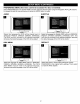
VIDEO OUT (Color Video Connector Type)
[]
Select the color video type to fit your connector type:
S-VIDEO: Select when using S-Video and Video OUT.
YUV: Select when using Component and Video OUT.
This setting does not affect when connecting with other
connections.
ANGLE MARK
[]
Select ON to tum the angtemarks on and OFF to turn them
off.
Anglemarks are not available on all DVDs.
OSDLANGUAGE CAPTIONS
i
SCREEN SAVER
o
ooO
Select the desired language (ENGLISH,
FRENCH) for the On-Screen display to
display text. Note that the DVD must
have the language included in order to
display it.
When this option is set to ON, closed
captions will appear on the screen for
the hearing impaired (if originally
recorded on the DVD). When this
option is OFF, the closed captions will
not appear.
When this option is set to ON, the
screen saver will come on when the
unit stops or the image is paused for
approximately one minute.
When this option is OFF, the screen saver
will not come on.
15