
Blu-Ray Player User Manual



35
BD/DVD OPERATION (CONTINUED)
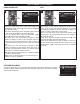
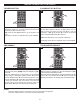
While in the Playback mode, press the REPEAT button 1 once;
the Repeat Chapter icon will appear on the screen for a few
seconds and the currently playing Chapter will repeat
continuously. Press the REPEAT button
1 a second time; the
Repeat Title will appear on the screen for a few seconds and
the currently playing Title will repeat continuously. Press the
REPEAT button 1 again; the Repeat All indicator will appear
and the disc will repeat (only on some DVDs). Press the
REPEAT button
1 once more to cancel all Repeat modes. This
is not available on all discs.
Press the Display button
2 to check the status of the Repeat
function.
2
1
1
REPEAT PLAYBACK
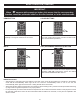
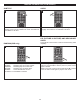
Press the ZOOM/Blue button 1 once during Normal, Slow or
Still playback modes, and the unit will zoom in. Repeatedly
press to zoom in more (2x, 3x, 4x) and then zoom out (1/2,
1/3, 1/4). Use the Navigation (√,®,π,†) buttons 2 to move
the image on the TV screen. Press the ZOOM button 1 once
more to cancel the zoom function. This feature is not
available on all discs.
2
1
1
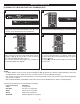
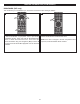
While in the Playback mode, press the ANGLE button; the
total number of angles will appear on the screen.
Repeatedly press the ANGLE button to select the desired
angle; the angle will change in one to two seconds. This
feature is not available on all discs.
1
ZOOM (DVD only)
The image on the screen can be magnified as follows:
ANGLE
Some discs may contain scenes which have been shot
simultaneously from a number of different camera angles.
This feature only works on discs with more than one camera
angle. The jacket will be marked with “ ”.
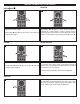
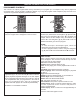
While in the Playback mode, press the Repeat A-B button to
define where you want the section to start. Press the Repeat
A-B button again to define where you would like the section
to end; the unit will then play the selected area continuously.
Press the Repeat A-B button again to cancel A-B Repeat
mode.
1
A-B REPEAT PLAYBACK (DVD only)
While playing back a disc, this unit can repeatedly play back
a specific section.