
Blu-Ray Player User Manual

24
SETUP MENU (CONTINUED)
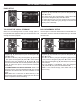
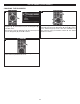
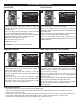
While in the General Setup menu, select Security using the
Navigation (π,†) buttons 1, then press the Navigation (®)
button 2 to enter.
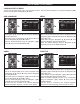
Select Security using the Navigation (π,†) buttons 1, then
press the Navigation (®) button 2 to select.
1
1
2
1
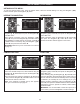
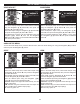
Select Change Password using the Navigation (π,†)
buttons 1, then press the Navigation (®) button 2 to select.
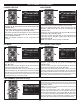
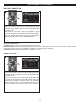
At the Password popup screen, enter the CURRENT four
digit password using the Number buttons 3. The default
password is “0000”.
1
1
2
3
2
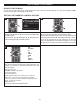
CHANGING THE PASSWORD
SETUP Exit
-
-- General Setting ---
Setup Menu
Use cursor keys to move focus, use
“
ENTER” key to select
System
Language
Playback
Security
Network
Screen Saver
Disc Auto Play bac k
Load Default
Upgrade
Easy Setup
On
On
More...
More
More
SETUP Exit
--- General Setting ---
Setup Menu
Use cursor keys to move focus, use
“
ENTER” key to select
S
ystem
Language
P
layback
Security
N
etwork
O
SD
Menu
A
udio
Subtitle
E
NGLISH
ENGLISH
E
NGLISH
ENGLISH
SETUP Exit
--- General Setting ---
Setup Menu
Use cursor keys to move focus, use
“ENTER” key to select
System
Language
Playback
Security
Network
Closed Caption
Angle Mark
PIP Mark
Secondary Audi o
Last Memory
On
On
On
On
On
SETUP Exit
--- General Setting ---
Setup Menu
Use cursor keys to move focus, use
“ENTER” key to select
S
ystem
Language
P
layback
Security
N
etwork
C
hange Password
Parental Control
SETUP Exit
--- General Setting ---
Setup Menu
Use cursor keys to move focus, use
“ENTER” key to select
System
L
anguage
Playback
Security
Network
Internet Connection
I
nformation
Connection Test
IP Setting
Host Name Setting
Enable
M
ore...
More...
Auto
Default
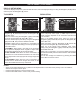
Then enter the new password twice using the Number
buttons and then password will be set.
3