
User manual




SwitchX®-2 12 Port InfiniBand Switch System Hardware User Manual Rev 1.0
Mellanox Technologies
11
1 Overview
Mellanox SX6012 and SX6005 switch systems provide the highest performing fabric solution in
a 1U half-width form factor by delivering up to 1.3Tb/s of non-blocking bandwidth with 170ns
port-to-port latency. These switches are the industry's most cost-effective building blocks for
embedded systems and storage with the need for a low port density switch. Whether looking at
price-to-performance or energy-to-performance, the Mellanox 12 port FDR switches offer supe
-
rior performance, power and space reducing capital and operating expenses, providing the best
return-on-investment.
The VPI switch running as an InfiniBand system switch is built with Mellanox’s 6
th
generation
switch device (SwitchX
®
-2 switch device), and provides up to 56Gb/s full bidirectional band-
width per port. These stand alone switches are an ideal choice for smaller departmental or back-
end clustering uses with high-performance needs, such as storage, data base and GPGPU clus
-
ters.
The switch comes pre-installed with all necessary firmware and is configured for standard opera-
tion within an InfiniBand fabric. This switch requires an InfiniBand compliant Subnet Manager
running from one of the hosts or Fabric Management software running on the fabric. All that is
required for normal operation is to follow the usual precautions for installation and to connect the
switch to the adapter cards. Once an unmanaged switch is connected, the Subnet Management
software automatically configures and begins utilizing the switch. Managed switches need initial
configuration before they will start working.
It is recommended that the Mellanox OpenFabrics software package be installed on all nodes
connected to the switch. The software package provides a subnet manager and network manage
-
ment tools as well as connectivity software for servers and storage, and is available on the Mella-
nox web site. See Section 5 on page 50 for more information.
Installation, hot-swapping components and hardware maintenance is covered in “Basic Opera-
tion” on page 16.
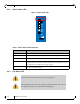
Figure 1: Internally Managed Switch SX6012
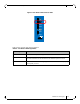
Figure 2: Externally Managed Switch SX6005
RST
PS1
UID
Mellanox
SX6012
PS2
1
2
3
4
5
6
7
8
9
10
11
12
RST
PS1
UID
Mellanox
SX6005
PS2
I2C
1
2
3
4
5
6
7
8
9
10
11
12