
User`s manual


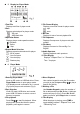


5 Display for Player Mode
1 Total File
Displays total files of player mode.
2 Port
Displays selected port for player mode.
: SD card
: USB flash drive
3 Operation Status
Displays player mode operation status.
: Playback
: Pause
: Stop
4 Repeat Mode Selection
Displays repeat mode selected for player.
: All file repeat
: One file repeat
: One-shot play
: Random play
5 File Format Display
Displays current file format for player mode.
: mp3
: wma
6 Bit Rate
Displays bit rate of current playback file.
7 File Sequence
Displays file sequence of player mode with
number.
8 File Name
Displays file name in Chinese Big-5 or
English.
9 Audio Spectrum
Displays playback audio spectrum.
10 Time Display
Displays " Elapsed Time " or " Remaining
Time " for player.
6 Player Mode
1 Entering Player Mode
Insert an SD card or a USB flash drive. Press
Player Mode button to enter player mode.
LCD displays mode confirmation for 1 second
(Fig.8) and player mode activates (Fig.4).
2 Port Selection
If both SD card & USB drive are inserted,
press USB / SD button to select a source
memory to operate.
3 File playback
Press Play to start file playback. When
playing back, press this button to pause
playback; press again to resume.
4 Direct Playback
Use number keypad to enter the file number
you wish to play and press Play to play a
specific file directly.
5 Deleting a File
Use Number Keypad to enter the number of
file to delete and press Del. Button. A dialogue
window will pop up (fig.6). Press Del. Button
again to execute; press Stop button to cancel.
6 Time Display
While the player is playing, press TIME to
toggle display between “ Elapsed Time “ and
“ Remaining Time”.
- 7 -