
User`s manual


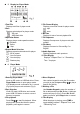


7 Display for Program Play
1 Operation Mode
Displays operation mode - Program Play.
2 Source File Sequence
Displays recorder or player source file sequence
for program play editing reference.
3 Total Playlist Files
Displays total number of programmed files in
playlist.
4 Source File Type
Displays source file type as follows:
P MOD ‧ : Player Mode - Normal text.
‧R MOD : Recorder Mode - Highlighted text
5 Total Source File Number
Displays total number of source mode from
recorder mode or player mode.
6 Last 6 Playlist Files
Displays the last 6 files in source file sequence
number. Files from player mode are displayed in
normal text; recorded files are displayed in
highlighted text.
8 Program Play
1 Editing a Program playlist
While the player is NOT playing, press and hold
PROG button to enter program play editing page
(fig.9).
2 Adding files to Program Playlist
(1) Press Mode button to select source files from
Recorder or Player.
(2) Use Number Keypad to enter the number of
file.
(3) Press PROG or REC button to add the file to
playlist.
(4) Repeat steps (1) ~ (3) until playlist is
completed. A maximum of 60 files can be
added to playlist.
3 Starting Program Play
Press Play button to start program play.
4 Deleting Files from Playlist
Press Del. button to delete one file from the end
of playlist.
5 Exiting Program Play Mode
Press and hold Stop button to exit program play
mode.
9 Segment Repeat
1 A- B Segment Repeat (MP3 format only)
While the player is playing, press A- B button to set beginning point A.
Wait for proper time to press A- B button again to set ending point B.
The player will play the loop repeatedly until A - B is pressed again to resume normal playback.
* WMA file does not apply to this function.
- 8 -