
User manual




8
smaller sound level, or use expanded microphone for the instruments.
4. If you want to record teachers' speech together with the playing of instruments, teachers can
use tie-clip microphone for better sound effect.
5. For better recording effect, the tie-clip microphone can be clip on the score stands or the body
of a player.
V. How to operate PLAY function
A. Enter VOC or MP3 mode?
Enter VOC mode to play the files recorded from microphones and LINE IN; Enter MP3 mode to
play the files downloaded from computer. The method to interchange VOC or MP3 modes:
Press ,take reference to the below LCD indication.
Play in VOC mode Play in MP3 mode
B. How to operate PLAY function?
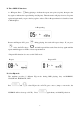
Setup flash memory or SD card (take reference to the operation on P. 9) , then select the track
number you want to play and press . The LCD will show and start to
play. Press
during playing to pause, the LCD show and flash. Press the
key again to continue playing.
Playing Pause
C. Forward or rewind during playing
Hold down during playing to rewind playing, hold down to forward playing,
the clock will move quickly according to the time of recording. Release the key and back to
normal play.