
User`s manual

44
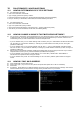
16.4 HOW DO I OPEN AN MS-DOS OR COMMAND PROMPT?
z Windows 98/Me: Start → Programs -> Accessories → MS-DOS prompt.
z Windows 2000/XP: Start → (All) Programs → Accessories → Command Prompt.
16.5 HOW DO I CHOOSE A PRIVATE IP ADDRESS: BELOW LISTS THE RANGES
FOR PRIVATE ADDRESSES.
z Private Class A address space: 10.0.0.0 – 10.255.255.255.
z Private Class B address space: 172.16.0.0 – 172.31.255.255.
z Private Class C address space: 192.168.0.0 – 192.168.255.255.
z For most cases you will choose a private IP address that falls in the Class C address space. (ex. 192.168.1.x or
192.168.0.x)
16.6 HOW DO I FORWARD A PORT IN MY ROUTER?
z For cases A&C you must forward a TCP port through your router. This port is the Port Number specified in the DVR.
For most cases you should be able to leave the default at 50000.
z Every router has a different procedure for forwarding ports. Please consult your router’s user guide on how to correctly
configure Port Forwarding.
16.7 CAN I CONFIGURE MY DVMR FOR REMOTE ACCESS USING A DIAL-UP
CONNECTION?
z Yes, it is possible, but not recommended. With a live video feed, the bandwidth that a dial-up connection provides is
very poor. In addition, you will have to install a device that allows your DVR to connect directly to your dial-up phone
line (roughly $200).
16.8 WHY IS MY REMOTE VIDEO JERKY?
z The frame rates received via the Internet are all dependent on your connection condition and speed at both the DVR
site and the location from where you are accessing the DVR. The fastest frame rates are achieved locally.