
User`s manual


38
13.2 IMAGE EDIT
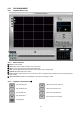
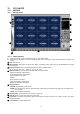
13.2.1 Image Edit Screen
13.2.2 Button Function
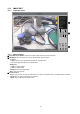
① Image Edit Status Window: Shows record time & date, Image size, Command status.
② Edit Button: User can adjust color tone of copied images using this button.
- Contrast:
a) Make bright part of image brighter and dark part of image darker.
b) To reduce light and shade, lower contrast a little.
- Brightness:
a) Make an image brighter.
b) Make an image darker.
- Sharpness: give sharp-edge effect.
- Blur: make an image soft.
③ Function button
a) Save: User can save an image in JPEG format. It is saved in the folder where you installed back-up CD player.
b) Print: User can print current image user selected.
c) EXIT: Return to Back-up CD Player mode.
1
2
3
Save Print Exit
a b c
Brightness
Blur
Sharpness
Contrast