
User`s manual


33
10.2 PLAYBACK MODE
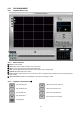
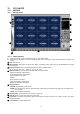
10.2.1 Playback Mode Screen
10.2.2 Button Function
① Exit: Exit to live window.
② Full screen: Select a certain camera to view in full screen.
③ Quad: To view quad mode (4 channels at the same time).
④ Time: The recording time & date information of the pictures which is being played.
⑤ Channel selection: Select each camera.
⑥ Time selection: Select a time from which user want to see. The playback will be started from this point (drag the point
using mouse).
⑦ Start and end time: Indicate record starting time and end time of images on HDD.
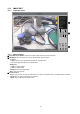
10.2.3 Playback Contorl Buttons (⑧)
1
2
3
4
5
6
7
8
9
10
: Stop playback
: Play fast backward
: Play forward (1X)
: Play fast forward
: Play backward (1X)
: Move to the start of recording
: Move to the previous hour
: Move to the afterward hour
: Move to the end of recording