
User`s manual


32
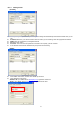
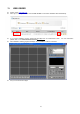
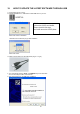
z Click ‘Connect’ button to date ‘IP Address’ and ‘Port’ number as below.
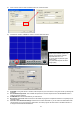
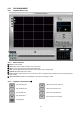
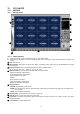
z Click Remote Viewer’s ‘CONNECT’ button to connect network as below.
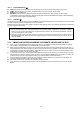
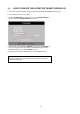
[PTZ/SAVE]
z PTZ TYPE: If using PTZ device or camera, select the protocol your PTZ camera is using from the list of preconfigured
protocols.
z Circular Monitoring Interval: This indicates the speed of the channels sequence when the SEQUENCE button is
used from the main interface.
z PTZ Baud Rate: Enter the Baud Rate of your PTZ camera.
z Run in full screen mode: When checked, this will enable the program to re-adjust the interface to completely fill your
computer screen.
z Set Path to Save Downloaded image: Determines the location and folder on your PC where the downloaded video
clips are stored. If you do not specify a valid location, the viewer program will save all files in the default location of
C:\Program Files\DvrRemoteViewer4/8/16.
[Network Speed]
Please adjust Network Speed to the
network circumstances. Allowed
adjustable limits are 1~10.
(1): Slow network speed but higher
image quality.
(10): Fast network speed but lower
image quality.