
User`s manual


31
10.1.3 Setting Screen
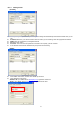
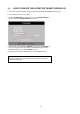
[IP/PORT]
z Name (LABEL): This just identifies your settings. The settings are automatically saved under this label when you hit
‘OK’.
z IP Address: Based on your network scenario and from where you’re accessing, enter the appropriate IP address.
z PORT: Enter the Port Number you assigned the DVR.
z ID: Always enter ‘admin’.
z Password: This must match the password on the DVR. For simplicity, just use numbers.
z It can add and save several IP Addresses for prompt multi-site monitoring.
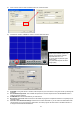
[DDNS]
z Click ‘DDNS’ radio button, and then click ‘DDNS’ tap as above.
z Input ‘Member ID’ and ‘Name’.
- Member ID: Input DDNS Server (www.j2kip.com) registered member ID.
- Name: Input DDNS Server (www.j2kip.com) registered DVR name.