
User`s manual

25
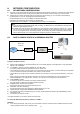
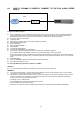
8.6 CASE E: DYNAMIC IP DIRECTLY CONNECT TO THE DVR w/HIGH SPEED
CABLE
Configure the DVR as follows:
z For this application you can still use the DVR for remote access, yet you will have to verify the IP address within the
DVR on a continuous basis to ensure the IP address hasn’t changed. This setup will not work with most Dynamic
DSLDKDKD providers. In any instance in which the DVR cannot detect an IP, please use CASE C.
z Unplug the power from the modem.
z Turn off the DVR.
z After waiting 5 minutes, power on the modem followed by the DVR.
z Enter the TCP/IP Setup menu.
z Enter DHCP Setup.
z Select IP DETECT MODE.
z Press ENTER.
z It should now display DHCP.
z Cursor down to REQUEST IP and hit ENTER.
z The Unit will now send a request to a DHCP server asking for IP address information.
- If it is unable to detect an IP address, contact your ISP to reset the modem, before trying again.
- After an IP has been received, the lease time listed under IP LEASE TIME is just notifying you when the DVR will try to
renew the IP address. Typically it will try to receive the same IP, but it is a good idea to check your IP on a continuous
basis.
z Exit DHCP SETUP.
z Select IP ADDRESS to determine the IP address the unit has received.
z The DVR is now ready for access.
Accessing the DVR using the Remote Software for CASE E
LOCALLY:
z You cannot physically access the unit locally since a router was not used in this case.
REMOTELY:
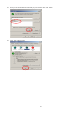
z To access the DVR remotely, open the remote viewing software and click on the ‘Settings’ button. As far as TCP/IP
connectivity is concerned only 4 entries need to be made.
z For CASE E, you have received a dynamic IP from your Internet provider. That dynamic IP address is what you must
enter into the software for connectivity to take place (this should be the same IP address configured in the DVR).
Check your DVR’s current IP address for access:
- IP address: 24.106.1.195(example).
- Port: 50000(this has to match what is configured in the DVR).
- User ID: (always leave the default ‘admin’).
- Password : this must match what is configured in the DVR [4,8,16 channel default: Blank (NO PASSWORD)]
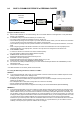
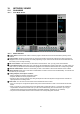
DVR
Internet
(ISP)
Modem
CATV