
User`s manual


18
7. OPERATION
7.1 SYSTEM LOG-IN
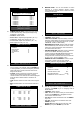
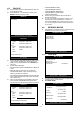
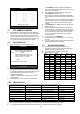
z To enter into the SETUP menu, press MENU key.
z Enter password with Channel Number keys from
No.1 to No.10 on the front of the DVR unit.
(Maximum of 8 digits are available)
z After inputting the password, press ENTER key.
7.2 SCREEN CONFIGURATION
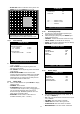
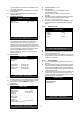
z Refer to following display references on the screen;
1. Current Time & Date
2. Camera Titles
3. Status Symbols
7.3 MONITORING
7.3.1 Normal Screen
z For full image display, just press the Channel key
which you want.
z Switch to multi-screen display by pressing MODE key.
z Six & Eight split screen is not available at Dual
playback mode. 240(200)IPS@360x240(360x288)
7.3.2 Sequencing
z Press SEQ key on the IR Remote Control. It
automatically displays full screen images in sequence.
(Full Screen → Split Sceen → Full Screen)
z SEQ key will be working only by IR Remote Control.
7.3.3 PIP (Picture in Picture)
z When it is in full screen display mode, you can see
other camera in a small window by pressing PIP key
on the IR Remote Control.
z The other camera in small window is rotating in
sequence to next number of camera and you can set
the rotating time interval as per the procedure in
SYSTEM MENU > CONFIGURATION > INTERVAL
SETUP.
z PIP key will be working only by IR Remote Control.
7.3.4 Freeze
z Full display mode: If you press the FRZ key, the FRZ
icon will be activated on the screen and ‘F’ character
will be shown beside camera title, and live image will
be frozen.
z Split display mode: If you press the FRZ key, the FRZ
icon will be activated on the screen. Press the
Channel key which you want to freeze.
z To release frozen image, press Channel key of frozen
image again and press FRZ key to exit FRZ mode.
7.3.5 Zoom
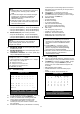
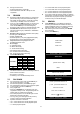
z In full screen, press the ZOOM key and move the
Selection Frame using Jog/Shuttle or ▲▼
◀ ▶ keys
to the area which you want to enlarge. And then press
the ENTER key for 2-times enlarged picture.
z To exit Zoom mode, just press ZOOM key again.
DVR LOG-IN
ENTER PASSWORD : _ _ _ _ _ _ _ _
INPUT YOUR OWN PASSWORD
TO EXIT, PRESS [MENU]
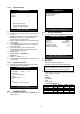
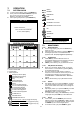
Emergency Record (Red)
Schedule Record (Green)
Record Stop (White)
Stop
Forward Playback
Backward Playback
Pause
1/4~1/2x forward playback
1/4~1/2x backward playback
2~16x forward playback
2~16x backward playback
16~64x forward playback
16~64x backward playback
A
LARM Record
MOTION Record
CONTINUOUS Record
4ch: 60(50), 8/16ch: 120(100) IPS [@720x240(288)]
4ch: 120(100), 8/16ch: 240(200) IPS [@360x240(288)]
4ch: 240(200)
, 8/16ch: 480(400) IPS [@360x120(144)]
BASIC
NORMAL
ENHANCED
FINE
SUPER FINE
ETHERNET Connected
ETHERNET Disconnected
PIP
FREEZE
SEQUENCE
ZOOM
HDD Status
In Monitoring Mode: Amount of data recorded.
In Playback Mode: Amount of data played.