
User`s manual


17
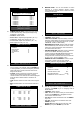
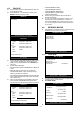
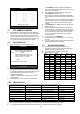
z COMMAND SETUP
- CHANNEL: Select channel.
- MODEL: Select camera model (protocol type) per
each channel.
- PTZ ID: Select ID (000~255).
- BAUDRATE: Select data transmission speed.
- CMD DELAY: Select command delay time.
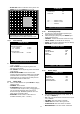
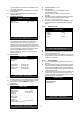
z SPEED SETUP
- PAN SPEED: Set Pan speed.
- TILT SPEED: Set Tilt speed.
- ZOOM SPEED: Set Zoom speed.
- FOCUS SPEED: Set Focus speed.
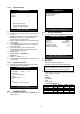
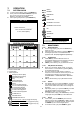
6.7 FACTORY DEFAULT
z Set the all system parameters as manufacturer first
set before delivery. It is a kind of system initialization,
and manufacturer recommends to do it when you add
new HDD or other changes in system to make all
system ready for normal operation.
z Use ▲▼
keys to move and Press ENTER key to
change parameters.
z Move to RUN and press ENTER key for actual
Factory Default setting.
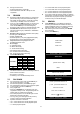
6.8 LANGUAGE
z The menu can be displayed in a number of languages.
z Press [+] [−] key to select your language.
COMMAND SETUP
CHANNEL 01
MODEL PELCO-D
PTZ ID 000
BAUDRATE 2400 BPS
CMD DELAY 1 MSEC
COMMAND PAN / TILT STOP
LENGTH 07
CODE FF 00 00 00
00 00 00
SELECT: ▲▼
,
CHANGE VALUE : + -
SPEED SETUP
PAN SPEED
TILT SPEED
ZOOM SPPED
FOCUS SPEED
SELECT: ▲▼
,
CHANGE VALUE : + -
FACTORY DEFAULT
ALL ON
SCREEN DISPLAY ON
CAMERA COLOR SETUP ON
MOTION SETUP ON
PANTILT SERUP ON
SCHEDULE SETUP ON
CONFIGURATION ON
RUN
SELECT MENU : ▲▼
,
&
[
ENTER
]