
User`s manual


14
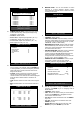
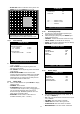
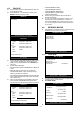
z RESOLUTION (8/16ch): Set recording resolution.
- 120 ips at 720x240(NTSC) , 100 ips at 720x288(PAL)
- 240 ips at 360x240(NTSC) , 200 ips at 360x288(PAL)
- 480 ips at 360x120(NTSC) , 400 ips at 360x144(PAL)
z RESOLUTION (4ch): Set recording resolution.
- 60 ips at 720x240(NTSC) , 50 ips at 720x288(PAL)
- 120 ips at 360x240(NTSC) , 100 ips at 360x288(PAL)
- 240 ips at 360x120(NTSC) , 200 ips at 360x144(PAL)
z RECORD IN ALARM: Set record speed (skip rate) in
ALARM record mode.
z RECORD IN MOTION: Set record speed (skip rate) in
MOTION record mode.
z CONTINUOUS RECORD: Set record speed (skip
rate) in CONTINUOUS record mode.
6.4.2 Schedule Setup
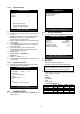
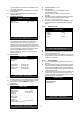
z To set Schedule Recording parameters, enter into
SCHEDULE SETUP and Press ENTER key.
z Unless you selected other recording mode, DVR
system records in Schedule Recording mode.
z In SCHEDULE REC SETUP, you set type of
recording for every time interval of 2 hours in each
day of the week.
z Schedule Recording set by manufacturer is recording
continuously at its full recording speed, and it means
DVR system record continuously at 120 ips in total at
720x240 resolution.
z Use [+] [−] key, to change the record type.
z Use MODE key to select edit type and move to the
time interval of a day of the week you want to change.
z To go next page, use NEXT key.
z RECORD TYPE;
- A: Alarm Recording.
- M: Motion Recording.
- C: Continuous Recording.
- AM: Alarm & Motion Recording.
- AC: Continuous & Alarm Recording.
- MC: Continuous & Motion Recording.
z EDIT TYPE;
- ALL: Set page by page at once.
- CLEAR ALL: Clear page by page.
- TIME CELL: Set a time cell at once.
- WEEK: Set a day of the week at once.
- TIME ZONE: Set a time zone at once.
6.4.3 Holiday Setup
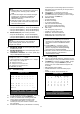
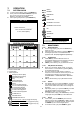
z Users can set national holidays on calendar to record
just as setting for Sunday in SCHEDULE REC SETUP.
z Use MODE key to select a month and ▲▼
◀ ▶ keys
to move to a day, and press ENTER key to set a
holiday. Then color of date shall be changed to red,
as Sunday.
- EDIT HOLIDAY: Set as holiday.
- CLEAR MON DATA: Cancel the holiday set per
month.
- CLEAR ALL DATA: Cancel all holiday set.
SCHEDULE SETUP
SUN
MON
TUE
WED
THU
FRI
SAT
00-02 -M- AM- --C –-C --C --C --C
02-04 -M- AM- --C –-C --C --C --C
20-22 -M- AM- --C –-C --C --C --C
22-24 -M- AM- --C –-C --C --C --C
MODE: ALL 1 / 2
SELECT:▲▼◀▶ & [NEXT], EDIT:+ - &[MODE]
A: ALARM M: MOTION C: CONTINUOUS
HOLIDAY SETUP
◀ SEP ▶ 000 / 100
S M T W T F S
1 2 3
4 5 6 7 8 9 10
11 12 13 14 15 16 17
18 19 20 21 22 23 24
25 26 27 28 29 30
MODE : EDIT HOLIDAY
SELECT ▲▼◀▶, EDIT [ENTER] & [MODE]
(Note) Set record speed (skip rate)
- Range: 1/1x, 1/2x, ………. 1/999x
- If record resolution is set at 360x240, 1/1x = 120 ips,
1/2x = 60 ips, 1/3x = 40 ips, etc.
- ex: 1/2x) R->S->R->S…
- ex: 1/3x) R->S->S->R->S->S->R…
- ex: 1/4x) R->S->S->S->R->S->S…
(R: RECORD, S: SKIP)
(Note) The maximum holidays are 100 days.
(Note)
(1) Default quality set by manufacturer In Emergency
recording mode, recording quality is SUPER
FINE.
(2) To send more images via IP network and longer
recording time, set QUALITY at NORNAL or
ENHANCED and record at 360x240. (4ch:
360x240 or 360x120.)
(3) Data size of image in PAL system is a little bigger
than NTSC system, but the total recording time is
same as in NTSC system.
(Note)
Recording in half resolution is recommended for
higher recoding speed, and also to send more
images via IP network.
(Note)
(1) Unless user press REC key to record at full
resolution and in SUPER FINE picture quality,
DVR system records in SCHEDULE Record
mode.
(2) Pressing REC key → Emergency record
(Continuous recording in full performance)
[8/16ch: 120(100) ips at 720x240(720x288)]
[4ch: 60(50) ips at 720x240(720x288)]
(3) DEFAULT record mode for each time interval of a
day of the week set by manufacturer is
CONTINUOUS recording.